![]()
禁止把 Windows PATH 注入到 WSL
现象
在编译buildroot时候提示:
1
2
3
4
5
6
7
8
| dky@LAPTOP-Q5IILQ3E:~/workspaces_buildroot/buildroot-2020.02.12$ make V=1
/usr/bin/make -j1 O=/home/dky/workspaces_buildroot/buildroot-2020.02.12/output HOSTCC="/usr/bin/gcc" HOSTCXX="/usr/bin/g++" syncconfig
make[1]: Entering directory '/home/dky/workspaces_buildroot/buildroot-2020.02.12'
make[1]: Leaving directory '/home/dky/workspaces_buildroot/buildroot-2020.02.12'
Your PATH contains spaces, TABs, and/or newline (\n) characters.
This doesn't work. Fix you PATH.
make: *** [support/dependencies/dependencies.mk:27: dependencies] Error 1
|
大意是说:path路径中包含空格回车等,导致编译失败。
查看printf '%s\n' "$PATH" | cat -A后发现有windows的path变量,如下:
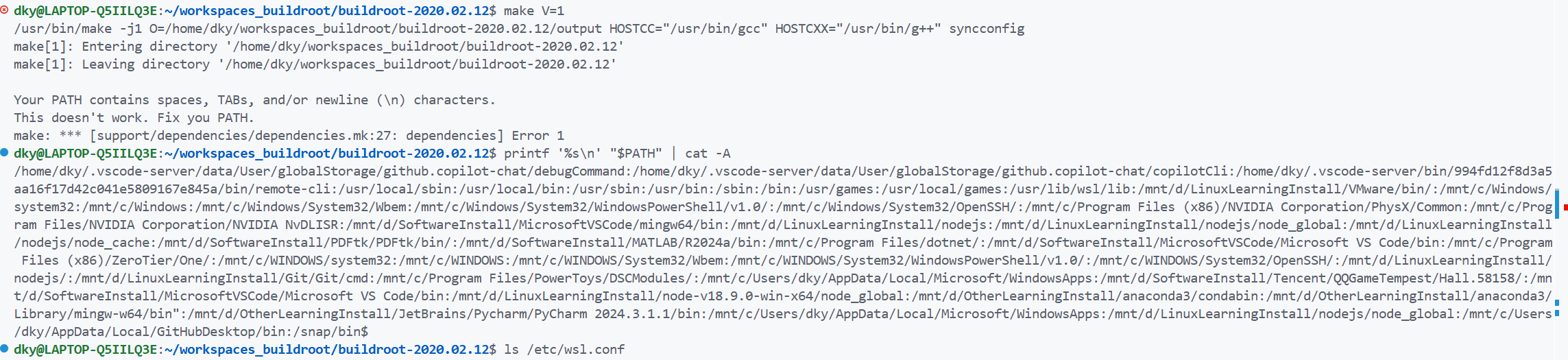
原因
这是因为WSL 默认会把 Windows 的 PATH拼进来
解决方法
因此解决方法就是:要么将这些多余的PATH环境变量暂时屏蔽掉,要么彻底关掉windows的path注入wsl。我选择后者,具体做法如下:****
- 编辑(或创建)这个文件:
- 写入:
1
2
| [interop]
appendWindowsPath=false
|
- 然后在 Windows PowerShell(不是 WSL 里)执行重启 WSL:
- 重新打开 WSL 终端,再检查:
1
| printf '%s\n' "$PATH" | cat -A
|
- 输出
1
2
| dky@LAPTOP-Q5IILQ3E:~/workspaces_buildroot/buildroot-2020.02.12$ printf '%s\n' "$PATH" | cat -A
/home/dky/.vscode-server/data/User/globalStorage/github.copilot-chat/debugCommand:/home/dky/.vscode-server/data/User/globalStorage/github.copilot-chat/copilotCli:/home/dky/.vscode-server/bin/994fd12f8d3a5aa16f17d42c041e5809167e845a/bin/remote-cli:/usr/local/sbin:/usr/local/bin:/usr/sbin:/usr/bin:/sbin:/bin:/usr/games:/usr/local/games:/usr/lib/wsl/lib:/snap/bin$
|